-
-
-
-
Building blocks of the data model
-
Basic concepts
-
Classes
-
Key fields
-
Local lookup lists
-
Fields and data types
-
Defining the columns of a table
-
Relations between classes
-
Global lookup lists
-
Filters
-
Universal connected classes
-
Deleting foreign records
-
Class inheritance
-
Storage of personal data on test and develop environment (scrambling)
-
Building blocks of the data model
-
-
User interface versions
-
Building blocks for user interface design
-
Adding styles with a css
-
Surrounding page
-
Changing snippets
-
Creating a custom login page (pre 3.4)
-
Creating a custom login page
-
Using velocity templates within the blueprint
-
Create your own web pages
-
HTML delivery requirements
-
How to customize system mails
-
User interface versions
-
-
Resource files
-
Velocity - How does it work?
-
Quick Velocity Tutorial
-
Debugging velocity scripts
-
Velocity Command Reference
-
Script Editor Tutorial
-
Using velocity for calculations
-
Using predefined forms in a html design
-
Velocity forms
-
Data field identifiers
-
Macros and methods
-
Velocity library
-
Velocity: using the #macro command
-
velocity and xml
-
Using AJAX in your velocity scripts
-
Resource files
-
-
-
Argon2 password conversion
-
Introduction to security
-
Secure development
-
Security certification
-
Security Exam
-
Field properties concerning security
-
Developing user groups securely
-
Security considerations for user interface
-
Secure file organization
-
Securely using the request
-
Cross Site Scripting (XSS)
-
Other options concerning secure development
-
Security analysis
-
Secure deployment
-
Secure application management
-
Scrambling of testdata
-
Anonymization of personal data
-
Using robots.txt
-
Permission settings
-
Security measures
-
Data encryption
-
Argon2 password conversion
-
-
Search Engine Optimization
-
OTP
-
User Interface migration guide
-
User account management
-
Instructies voor implementatie van visueel editen van nieuwsbrieven
-
Login as another user
-
Support
-
More information about moving to User Interface Version 4.0
-
Standaard page layout
-
Sections moved to layout
-
Aanpassingen in release 2024-7
-
Media library
-
Aanpassingen in release 2024-10
-
Analytics and Matomo
-
Registration forms
-
How to change names of classes and fields?
-
Responsible Disclosure Policy
-
How to upload a blob in Velocity?
-
Aanpassingen in release 2024-2
-
Instances
-
Componenten in onze technologie
-
Google Analytics
-
Street and City helper (postcodecheck)
-
Responsible disclosure-beleid
-
Postcode check service (straat en huisnummer) kosten
-
Expressions
-
Regular Expression Reference
-
Basic concepts
This is a short introduction to classes, which are the basic building blocks of an application.
Classes define categories of data in an application based on "real world" objects. In an application there might be classes like "person", "address", "company", "order" or "product".
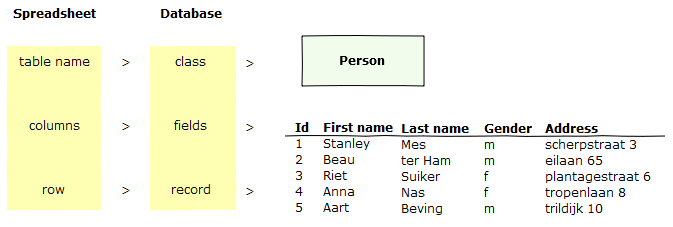
In case you are familiair with databases, you can consider a class as a table in a database. To put it another way, a class defines a list of items with the same properties. A person can have a name and address just like a product can be defined by a name, price, catagory and colour.
These properties can be defined in fields. They are like the column names in a table.
Every instance of a class, every person or product in this example, is called a record. In a table these are the rows. The records contain the actual data that will be stored in the database. The following image compares the basic terminology of databases with that of spreadsheets.
Key fields
In a database all records need a unique key. Any field that will be absolutely unique in a class can be used as a key field, like a product id. In case there is no such field, you can add a seperate key field that will get unique numbers automatically. It can be considered to hide this field from the view of most of your application's users since in most cases the field will have no meaning to them.
Relationships
Most applications have more than one class and usually the classes are related, meaning that there are connections between classes.
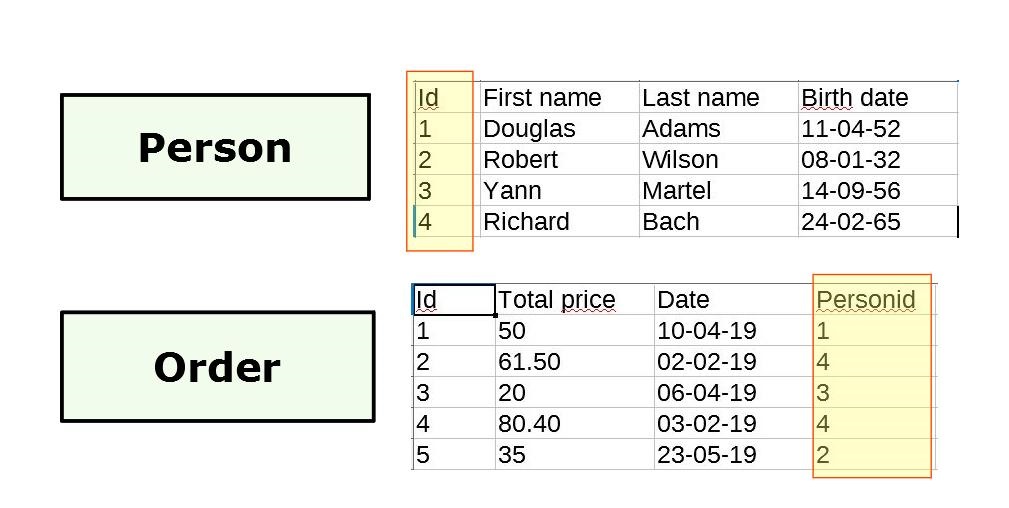
A relation is always of the type "one-to-many". One record from a specific class can be related to many records in another class. A client can place many orders, but a specific order always belongs to one client. Even though the class Order can contain orders from many different clients, a field in this class can be used to relate every order to the correct client. This field could for example be called ClientId.
In the "one-to-many" relationship, the "one" class is called the foreign class and the "many" class is called the connected class. The following image depicts this relation as a spreadsheet. The highlighted field in the class Order shows the corresponding Id of the client. In this example, the class Client is the foreign class and Order is the connected class.
When this connection is depicted in a diagram, the one-to-many structure is shown via the crow's foot.
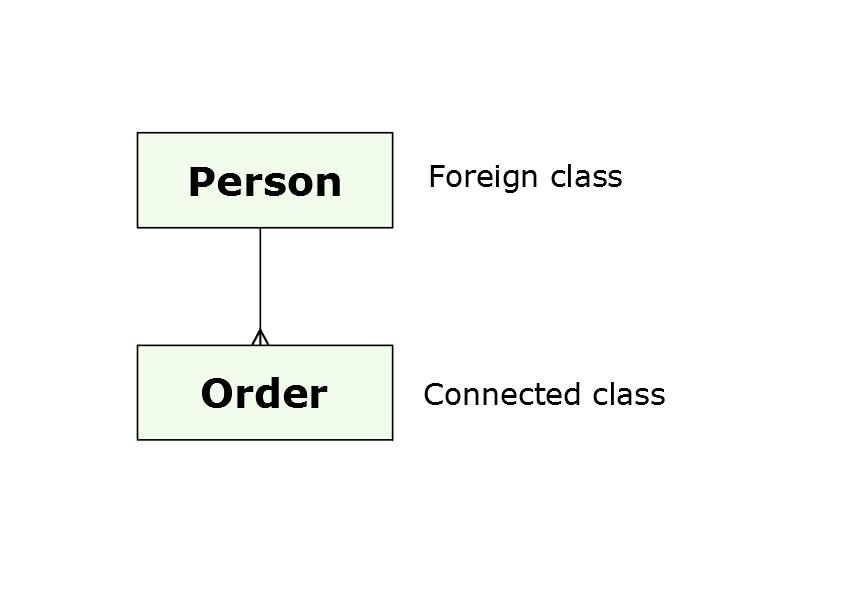
Classes can function as foreign class or connected class indefinitely, both as foreign class and connected class. However, two classes can not be related to each other, a many-to-many connection is not possible. Or, regarding the diagram, a connection can never have a crow's foot on both sides.
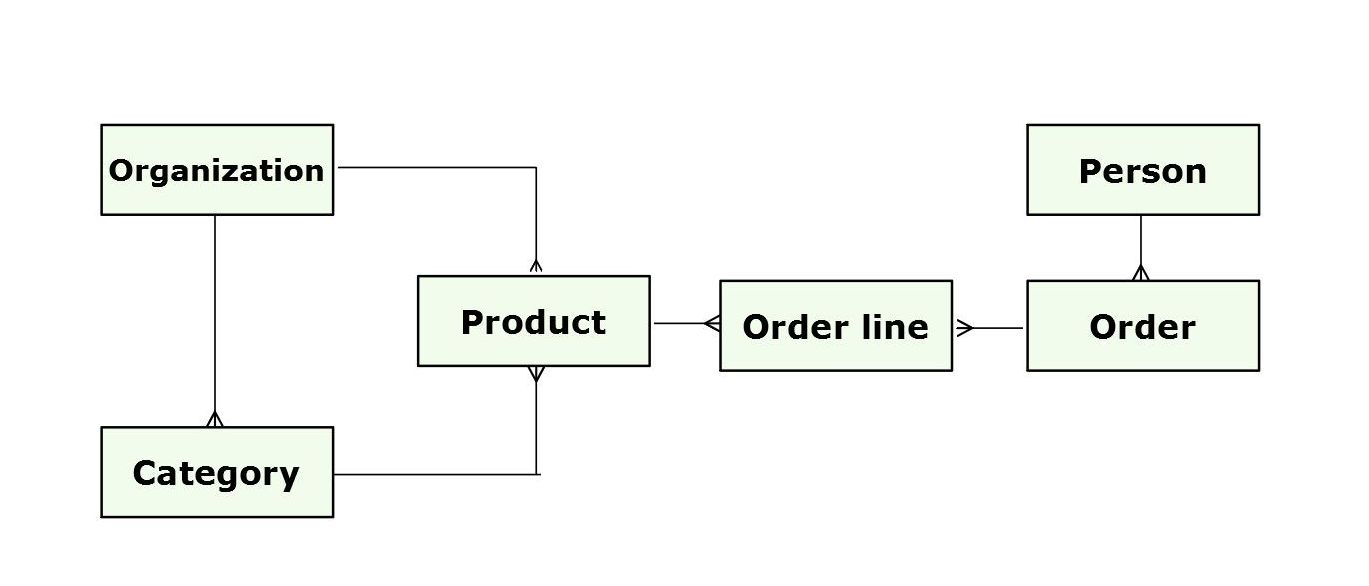
There are situations where this type of connection is needed. An order needs to relate to many products, yet one product can be related to more than one order. In this case an intermediary connected class is required. A standard name for this intermediary class would be Order-Product, a more common name in this example would be Order line.
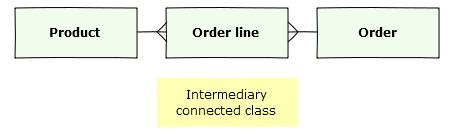
In this example the class Order holds information like order date, total costs, and shipping costs. The Order line class holds information about which product has been ordered, and in what quantity. On the other side there is a Product class, which can be connected to multiple orders. These can be traced back through Order line.
Basically, the intermediary connected class holds the list of every connection between products and orders.
Extended data model
This is a model with 6 classes, a possible model for a shop. When data-modelling, visualizing the structure can help to avoid unnecessary or illogical connections.