

-
-
-
- Building blocks of the data model
- Basic concepts
- Classes
- Key fields
- Local lookup lists
- Fields and data types
- Defining the columns of a table
- Relations between classes
- Global lookup lists
- Filters
- Universal connected classes
- Deleting foreign records
- Class inheritance
- Storage of personal data on test and develop environment (scrambling)
-
- Resource files
- Velocity - How does it work?
- Quick Velocity Tutorial
- Debugging velocity scripts
- Velocity Command Reference
- Script Editor Tutorial
- Using velocity for calculations
- Using predefined forms in a html design
- Velocity forms
- Data field identifiers
- Macros and methods
- Velocity library
- Velocity: using the #macro command
- velocity and xml
- Using AJAX in your velocity scripts
-
-
- Argon2 password conversion
- Introduction to security
- Secure development
- Security certification
- Security Exam
- Field properties concerning security
- Developing user groups securely
- Security considerations for user interface
- Secure file organization
- Securely using the request
- Cross Site Scripting (XSS)
- Other options concerning secure development
- Security analysis
- Secure deployment
- Secure application management
- Scrambling of testdata
- Anonymization of personal data
- Using robots.txt
- Permission settings
- Security measures
- Data encryption
-
- Search Engine Optimization
- OTP
- User Interface migration guide
- User account management
- Instructies voor implementatie van visueel editen van nieuwsbrieven
- Login as another user
- Support
- More information about moving to User Interface Version 4.0
- Standaard page layout
- Sections moved to layout
- Aanpassingen in release 2024-7
- Media library
- Aanpassingen in release 2024-10
- Analytics and Matomo
- Registration forms
- How to change names of classes and fields?
- Responsible Disclosure Policy
- How to upload a blob in Velocity?
- Aanpassingen in release 2024-2
- Instances
- Componenten in onze technologie
- Google Analytics
- Street and City helper (postcodecheck)
- Responsible disclosure-beleid
- Postcode check service (straat en huisnummer) kosten
- Expressions
- Regular Expression Reference
-
How to get started?
The CrossmarX Application Platform is a rich environment for developing, running and maintaining a large variety of business applications.
Our main targets are maximizing:
- development efficiency
- speed of delivery
- ease of maintainance
We accomplish this by developing a generic application engine. The engine contains functions for:
- search, read, insert, update and delete data from a database
- fine-grained user access rights
- inbound and outbound email functions and statistics
- content management for intranets and websites
- forms and questionnaires
- queries and reports
- charts
- dashboards
- scheduled batch jobs
- single sign on
- Google Maps integration (plus support for webservices.nl)
- social media integration (Facebook, Twitter)
- chat
- imports and exports
- deduplication functions
- data cleaning
- support for Cendris webservices (address validation and completion)
- support for payment services (iDEAL, PayPal)
The engine contains all functionality that is commonly used in business applications, but does not contain domain-specific knowledge.
To create an application you just have to configure the available functions or add your own functions. The total configuration is called a blueprint. The following steps are followed.
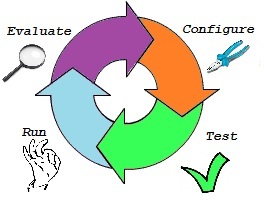
- Configure
You can start developing right away by configuring the blueprint for your application. This can mostly be done by mouse clicks, without programming. - Test
Almost instantly the application can be tested by its future users. Feedback can be implemented by modifying the blueprint. - Run
The first version of the application can be used immediately. - Evaluate
User experiences can be collected and evaluated, and as soon as demands change, the configuration can be modified.
Benefits
In an average application 80% of the functionality is created without writing code. This results in very fast development and high flexibility. The benefits of this approach are:
- faster development: operating the mouse is less time consuming then writing code.
- jump start: create a first prototype in minutes.
- easier maintenance: understanding a blueprint is much easier than understanding script files.
Learn more about the blueprint.